Spectrum CNC Technologies: Developer of Multi-DNC CNC Manufacturing Software
HomeProductsAbout Us
DealersSupport
Testimonials
Contact Us
Login
Spectrum CNC Technologies Specials
More Upcoming Events Click for more info See us at WESTEC 2010
 

Multi-DNC Wireless System™
Wireless Done Right! 


Highlights


WiBox™ Wireless DNC  
  • No cable to purchase and run
  • Move or add machines anytime anywhere without re-cabling
  • Network 250+ machines
  • True integration to the Multi-DNC communication software
  • Combine wired and wireless DNC
  • High data rates over long distance IEEE 802.11 b/g support
  • Data Security WEP/WPA/WPA2/TKIP encryption

Features

  • Bi-directional wireless CNC machine communication and machine monitoring, eliminating costly cabling
  • Assign each CNC machine it’s own IP address
  • Industry standard IEEE 802.11 b/g wireless interface
  • Data Encryption 128-256 bit
  • Supports Wireless or Wired Ethernet
  • Powered off the CNC control – no need for 110v at every machine
  • Two standard DB-9 RS-232 ports – surge protected
  • Flow Control – software XON/XOFF and hardware RTS/CTS
  • Supports special protocols such as Mazatrol CMT and Fagor DNC

Overview

Wirelessly Connect, Monitor, Manage and Control CNC machines

Spectrum WiBox dual port device servers enable you to connect all of your shop floor CNC Machines using IEEE 802.11b/g networks quickly and easily. This simplifies connectivity when your shop floor layout is rearranged. The Spectrum WiBox becomes a wireless virtual cable between you and your CNC Machines over your network.

Spectrum WiBoxes use industry standard WEP/WPA/WPA2/TKIP advanced encryption methods to ensure that your data is secure. And their RS-232 ports have 4Kv of ESD surge protection per port.

 
  click to enlarge

Installations of Spectrum WiBox devices are easy because the Windows software drivers are automatically installed with Multi-DNC.  The integrated Spectrum WiBox Device Manager allows you to acquire, manage and maintain each WiBox device for your Multi-DNC system from a single PC over your company network.

  • At a Glance overview of your shop floor wireless network.
  • Auto Re-connect – when you power up your machine tool, Spectrum’s Wireless Multi-DNC software automatically re-connects to your CNC machine and you’re ready to go.
  • Radio Signal Strength Indicator (RSSI) – graphically displays the radio signal strength of each WiBox unit so you can configure your system for optimum performance.
  • Firmware Updates - are easy, simply select the unit, click the firmware update button from our WiBox device manager screen and that’s it! Update done.

The Multi-DNC Wireless DNC system supports a variety of Wireless Access Points (WAP). We can use your existing wireless infrastructure or we can provide you with the appropriate WAP.

How does it work?

By TRUE software and hardware integration! Spectrum CNC Technologies partnered with a leading wireless hardware company to customize an off the shelf wireless unit specifically for the machine tool industry.

Spectrum CNC Technologies has developed a unique bridge between the WiBox and the Windows operating system called the Spectrum WiBox Device Manager. Device Manager is accessed from within Multi-DNC and allows you to easily setup and manage single or multiple WiBoxes. There are 4 key elements required for a stable and reliable wireless DNC network in a shop floor environment; Multi-DNC software, Windows software drivers, firmware embedded in the WiBox, and the Spectrum WiBox hardware device itself. All of these key elements are easily monitored or managed thru the Device Manager interface. You can also upgrade firmware, monitor WiBox activity and the wireless connection thru the Spectrum Device Manager interface.

Multi-DNC consistently pings each WiBox and looks for a reply from the WiBox knowing whether it is on line or offline. If the WiBox, WAP, CNC or MDNC are turned off, once they power up, the WiBox will automatically connect to the WAP and Multi-DNC will automatically connect to the WiBox.   

The WiBox is mounted inside the CNC machine cabinet. This allows the WiBox to hook into the DC power supply of the machine using between 6v to 30v. This eliminates the need for external electrical hookups, transformers, external RS-232 cabling, and external surge protection. A short serial cable is connected from the WiBox to the CNC’s RS-232 port.  A magnetic mount antenna is placed on top of the control cabinet for the best reception. 

The Spectrum WiBox has best of class RS-232 through put at any baud rate supported by CNC machines. Primarily, this is due to the efficient integration of the 4 key elements identified above. This is a key feature because the WiBox is mounted inside the CNC cabinet and uses a short RS-232 cable it allows you to use the fastest baud rate supported by your CNC machine.

The Multi-DNC Wireless system is run over an IEEE 802.11b/g wireless Ethernet network (WLAN). Depending on the size of your shop one or more Wireless Access Points (WAP) are connected to your existing LAN and DNC server. The Spectrum WiBox unit is mounted inside each CNC machine in the shop. When you send the CNC file from Multi-DNC, it transmits across the LAN thru the WAP which wirelessly transmits the file out to each Spectrum WiBox with its own IP address. The file is then transmitted by a short RS232 cable from the WiBox port to the CNC serial port.

If you are looking for a transparent, cost effective, and scalable way to connect your CNC Machines to your DNC network, look no further than the Multi-DNC Wireless System.

Other wireless solutions by Spectrum CNC: WiPak™ Embedded Wireless PC

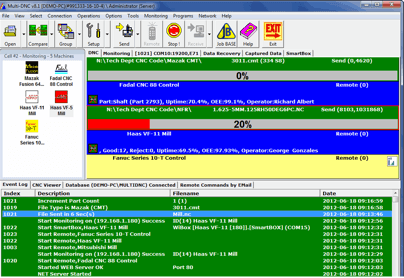
Optional SmartBox display for CNC Operators


HOME  |  PRODUCTS  |  ABOUT US  |  DEALERS  |  SUPPORT  |  TESTIMONIALS  |  CONTACT US

Toll Free: 1-877-882-6362 (MDNC)  Phone: +1 951-549-0755  Fax: +1 951-549-0759
© 1989-2009Spectrum CNC Technologies, All Rights Reserved
Site designed and maintained by Marketing Matters, Inc.